Hacking Tut

  • Home
  • Features
  • _About us
  • _Contact us
  • _Site map
Showing posts with label Android. Show all posts

Thursday, 7 October 2021

How to earn money from Google Adsense?

Admin Android , Earning
How to earn money from Google Adsense?

What is Google Adsense: Google Adsense is one of Google's products. Through which anyone can advertise on Google or earn money online with ads.

If you want, you can earn money by taking Google Adsense ads from Google and showing them to others in various ways. For example, suppose you have a YouTube channel. Now if you want, you can earn money by showing these Google ads on your YouTube channel. Moreover, you can also earn money from Google Adsense by using other ways.

Earn money by showing Adsense ads: You can earn money from Adsense by adopting various ways. For that, you must have a platform. You must have followers or viewers for that. Because from Google, you have to earn money by watching ads from others.

If you explain with an example, you may easily understand how to earn money from Google Adsense. Suppose you have a website. Now you can earn money from this website through Google Adsense. By showing ads through your website from Google Adsense,,,, to earn income on your website,

First of all, you have to apply to Google Adsense for your website. If your website meets the conditions of Google Adsense, everything is fine. Then Adsense will approve you. From then on, you can place ads on your website.

The more people see the ads on your website, the more money will be added to your Google Adsense account. In this way, you have to place ads on your website and show them to others,,, the more people see the ads, the more your income will be in your Google Adsense account.

How to withdraw money from Google Adsense?

Withdrawing money from Google Adsense: Generally, the more people see your ads from Google Adsense, the more your income will be. In this way, you have to deposit $ 10 in your account first. When $ 10 is deposited in Google Adsense, a letter will come to your address. To the address you used to open the Adsense account.

When you receive the letter, submit the PIN of this letter to Google Adsense and your address will be verified. Then you can add any bank account in your country if you want.

Then you have to earn more on Google Adsense. When $100 is deposited in your account while earning, Google will automatically send money to your bank. You do not have to send an extra request for that. Once the money in your account reaches $100, you will get the money every month from then on.

By doing this, you will easily get money from Google Adsense. I have tried to explain step-by-step what is Google Adsense? And how can you earn money from Google Adsense? And I have also given an example of a means of earning this money.
Read Full Post »
By Admin - 18:33
Labels: Android, Earning, Web development

Saturday, 17 July 2021

Enjoy a total of 35 tools for free || মোট 35 টি Tools Enjoy করুন সম্পূর্ণ ফ্রিতেই

Admin Android , Computer Tips
Enjoy a total of 35 tools for free ||  মোট 35 টি Tools Enjoy করুন সম্পূর্ণ ফ্রিতেই

একটি Free site, যেখান থেকে আপনি বিভিন্ন Premium Site এর video,photo,vectors & music Download করতে পারবেন অনায়াসেই।

নিচে কিছু সাইটের List দেয়া হল যার Premium fileগুলো Download করতে পারবেন downloader.la Use করে
  • Shutterstock
  • Adobe Stock
  • Gettyimages
  • StoryBlocks
  • SoundCloud
➳ উপরে উল্লেখিত সব সাইটের Premium Fileগুলো ফ্রিতেই Download করতে পারবেন কোন ঝামেলা ছাড়াই।


Website Link:- https://downloader.la/


⌘ তাছাড়া এই Site থেকে যেকোন Scribd Documents File Download করা যায় এবং Facebook/Instagram Video Download এরও Option রয়েছে এতে।


এই সাইটের Problemটা হল সব কিছু Accurate Resolution এ পাবেন না। আর তাছাড়া Commertial Use এর জন্যও এই Site না। Google Ads একটু বিরক্তির কারণ হতে পারে, তবে আর কোন Problem দেখা যায়নি এই সাইটে।


সবশেষে একটা কথা Mention করে দিতে চাচ্ছি আপনি সব Premium Site এর File download এর সময় অবশ্যই নিচে Example Link টা Check করে নিবেন যেন তা আপনার কাঙ্খিত Link এর Format এর সাথে মিলে যায়।


Read Full Post »
By Admin - 15:43
Labels: Android, Computer Tips, Other

Use YouTube's premium app for free and check out its features

Admin Android , Computer Tips
Use YouTube's premium app for free and check out its features

বিশ্বের সবচেয়ে জনপ্রিয় অনলাইন ভিডিও প্লাটফর্ম YouTube (ইউটিউব)। যার ফলস্বরূপ আমরা সকলেই কমবেশী ব্যবহার করে থাকি। বিশেষ করে যাদের হাতে অ্যান্ড্রয়েড স্মার্টফোন এবং ওয়াফাই নেটওয়ার্কের ব্যবস্থা আছে, তারা সকলেই অনলাইনে যেকোন ভিডিও দেখার জন্য ইউটিউব ব্যবহার করে থাকি। তো আমি মূলত আজকে সেই জনপ্রিয় অনলাইন ভিডিও প্লাটফর্ম ইউটিউবের বিষয় নিয়ে হাজির হয়েছি। আমার এই টিউটোরিয়ালটি মূলত যারা অ্যান্ড্রয়েড স্মার্টফোনে ইউটিউব ব্যবহার করে থাকেন, তাদের জন্য। আমরা সবাই আমাদের স্মার্টফোনে যে ইউটিউব অ্যাপ ব্যবহার করে থাকি। তা কিন্তু মোবাইলে আগে থেকে ডিফল্টভাবে ফ্রি ভার্সন দেওয়া থাকে। যার ফলে আমরা ইউটিউব অ্যাপ এর বেসিক বা মৌলিক ফিচারগুলি ব্যবহার করতে পারি। কিন্তু অন্যান্য অ্যাপের মত ইউটিউবেরও প্রিমিয়াম ভার্সন রয়েছে। যাতে আরো অনেক ধরনের ফিচার রয়েছে। যা আমরা হয়তো অনেকেই জানি না এবং ঐ সুবিধা বা ফিচারগুলি থেকে বঞ্চিত হচ্ছি। তবে উক্ত প্রিমিয়াম এর সুবিধা আপনাকে কর্তৃপক্ষ দিতে পারে। যদি আপনি তাদেরকে মাসিক পেমেন্ট করেন। পেমেন্ট এর বিষয়টি তাদের বিভিন্ন প্যাকেজ আকারে ভাগ করা আছে। আমাদের অ্যান্ড্রয়েড স্মার্টফোন থাকতে কেন আমরা ইউটিউবের প্রিমিয়াম ভার্সন এর সুবিধা বা ফিচারগুলি ভোগ করব না। তাই চলুন আজকে থেকে ইউটিউব এর ফ্রি ভার্সন ছেড়ে প্রিমিয়াম ভার্সন ব্যবহার করি। কোনরকম টাকা দেওয়া ছাড়াই। ইউটিউবের প্রিমিয়াম ভার্সন অ্যাপটি আপনার মোবাইলে ইনস্টল করার পূর্বে 
microG নামের apk প্রোগ্রামটি এখানে ক্লিক করে ডাউনলোড করে ইনস্টল করে নিন। 
তারপর একদম ইউটিউবের সর্বশেষ প্রিমিয়াম ভার্সন এর অ্যাপটি 
ডাউনলোড করতে এখানে ক্লিক করুন এবং আপনার মোবাইলে ইনস্টল করে নিন। 
ইউটিউব প্রিমিয়াম অ্যাপের ফিচারসমূহ:
১. প্রথমত আপনি ইউটিউবে যেকোন ভিডিও একদম যেকোন অ্যাড বা বিজ্ঞাপন ছাড়া দেখতে পারবেন। অর্থাৎ ফ্রি ভার্সনের মত কোন ভিডিও দেখার সময় ৫ সেকেন্ডের কোন অ্যাড আসবে না। 
২. দ্বিতীয়ত যেকোন ভিডিও ডাউনলোড করতে পারবেন এবং পরবর্তীতে ইন্টারনেট ডাটা না থাকলেও অফলাইনে ভিডিও দেখতে পারবেন। যদিও ফ্রি ভার্সনে এই সিস্টেমটি চালু রয়েছে। তবে খেয়াল করে দেখবেন ফ্রি ভার্সনে কিছুকিছু ভিডিও ডাউনলোড দেওয়া যায় না। তবে এই প্রিমিয়াম ভার্সনে যেকোন ভিডিও ডাউনলোড দিতে পারবেন।
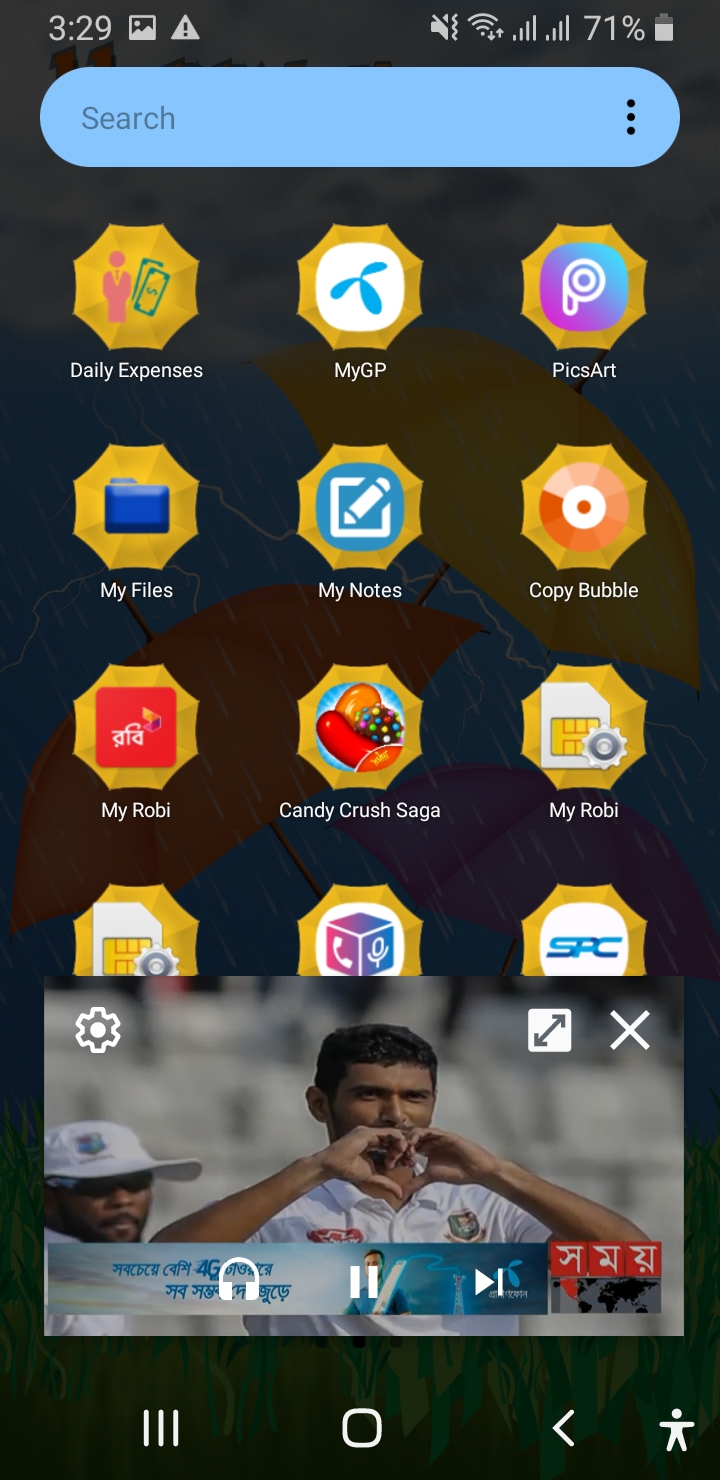
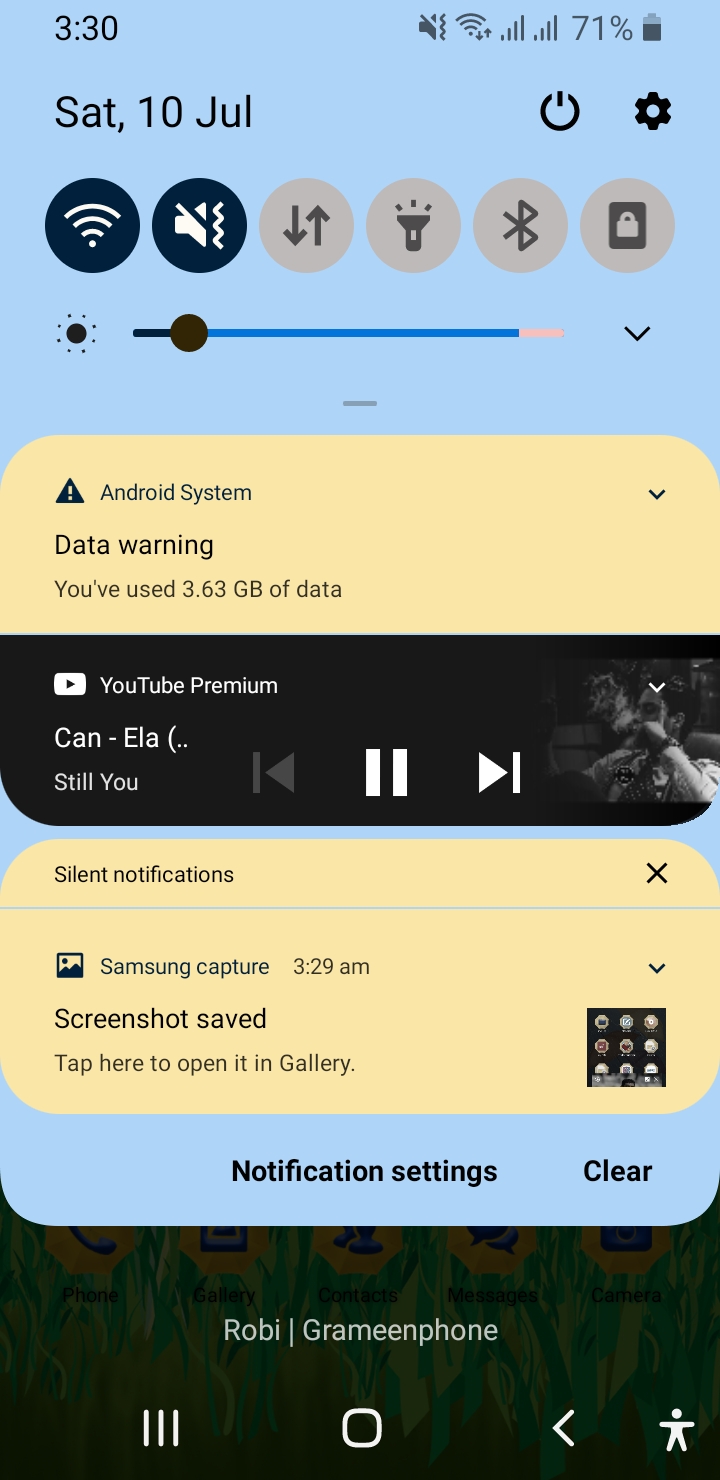
০৩. তৃতীয়ত আপনি যেকোন ভিডিও ব্যাকগ্রাউন্ডেও চালাতে পারবেন। অর্থাৎ আপনি আপনার মোবাইলে অন্যান্য যেকোন অ্যাপ ব্যবহারের সময় আপনি ইউটিউবে ভিডিও দেখতে পারবেন। এছাড়াও উক্ত ভিডিও আপনি ইচ্ছে করলে অডিও আকারেও শুনতে পারবেন। যা ফ্রি ভার্সনে করতে পারবেন না।
০৪. চতুর্থত ইউটিউবের সবচেয়ে জনপ্রিয় ফিচার ইউটিউব মিউজিক প্রিমিয়াম। মিলিয়ন মিলিয়ন গান শুনতে পারবেন কোনরকম অ্যাড বা বিজ্ঞাপন ছাড়া। যেকোন গান ডাউনলোড করতে পারবেন এবং পরবর্তীতে অফলাইনে শুনতে পারবেন। ব্যাকগ্রাউন্ড সিস্টেম করে অডিও আকারে।
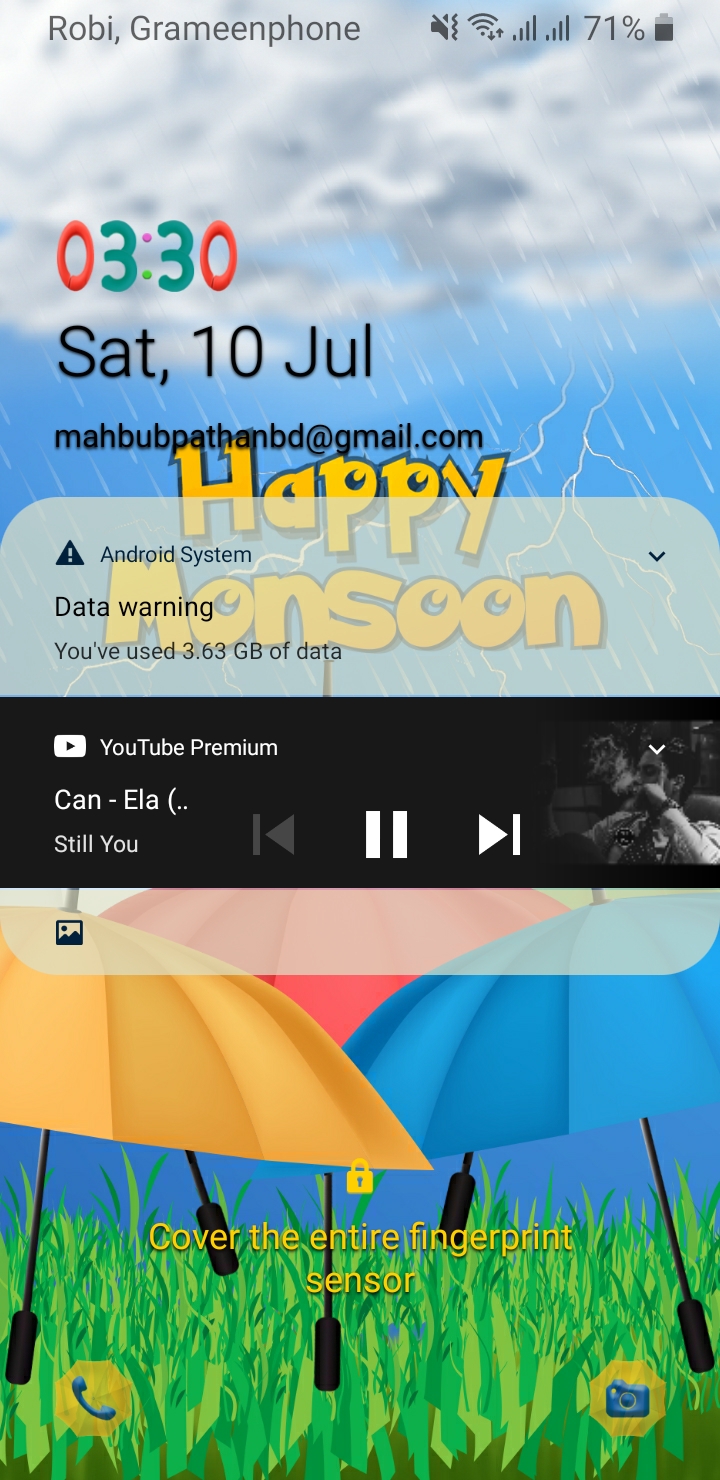
এছাড়াও আরো অনেক সুবিধা ভোগ করতে পারবেন। যেমন এর মধ্যে সচারচর একটা বিষয় হলো আপনি যখন ইউটিউব অ্যাপটি ব্যবহার করবেন। অর্থাৎ হোম পেজে থাকবেন। তখন ভিডিও প্লে বা চালু না করলেও অটো ভিডিও চলতে থাকবে। যার ফলে আপনি ভিডিও প্লে না করেই ভিডিওর পুরো বিষয়টি বুঝে যেতে পারবেন। এছাড়াও ব্যাকগ্রাউন্ডে প্লে করার সিস্টেম থাকাতে আপনি আপনার মোবাইল লক করেও ইউটিউব থেকে যেকোন গান বা অন্যকিছু শুনতে পারবেন। এইরকম আরো অনেক সুবিধা পাবেন অ্যাপটি ব্যবহার করলে। সর্বশেষ সাবধানতার জন্য বলে রাখি, অবশ্যই অ্যাপটিতে কোন জিমেইল অ্যাকাউন্ট বা আইডি ব্যবহার করবেন না। যদি ব্যবহার করে থাকেন এবং গুগল কর্তৃপক্ষ বিষয়টি বুঝতে পারে যে, আপনি কোনরকম টাকা পয়সা তাদেরকে না দিয়ে ফাকি দিচ্ছেন। তাহলে হয়তো তারা আপনার অ্যাকাউন্টটি আজীবনের জন্য ব্যান বা বাতিল করে দিতে পারে। তাই আমি বলব, সাধারণ একটা আলাদা করে জিমেইল অ্যাকাউন্ট তৈরি করে নিতে পারেন। এই অ্যাপটিতে ব্যবহার করার জন্য। কারণ আইডি থাকলে কিছু সুবিধা ভোগ করা যায়।
Read Full Post »
By Admin - 15:26
Labels: Android, Computer Tips, Hacking, Other

Sunday, 5 April 2020

Download Kinemaster Premium 2020 Free

Admin Android ,
Download Kinemaster Premium 2020 Free

Download Kinemaster Premium 2020

Download Latest Version for Free

Download Kinemaster Premium 2020

Read Full Post »
By Admin - 18:51
Labels: Android

Monday, 9 March 2020

Free Online TV || Watch Free Online TV Channels In VLC Player

Admin Android , Computer Tips
Free Online TV || Watch Free Online TV Channels In VLC Player


VLC is a open source software media player. Everyone use VLC for videos but few of you may know that you can Watch Free Online TV Channels In VLC Player.

VLC Streaming Overview

now you can easily stream online tv channels through VLC player .it’s simple just to install VLC player on your PC and follow these steps and enjoy watching your favourite programs on even at low speed. VLC is a simple fast and powerful media player. It plays almost everything Files, Discs, Webcams , Devices and Streams.The best thing about VLC player is that it runs on all platforms Windows, Linux, MAC OS X, Unix.

Watch Free Online TV Channels In VLC Player – Guide

Step#1

Open VLC media player. If you don’t have then Install VLC player on your PC here.
download button 

Step#2

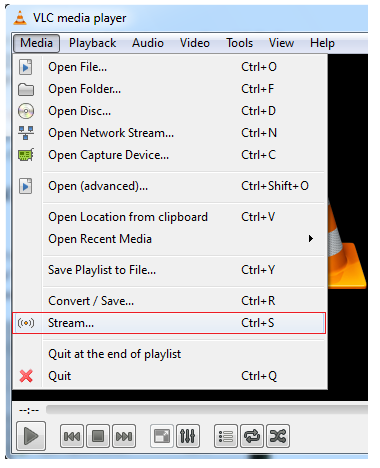
Go to the ‘MEDIA’ from MENU BAR and select ‘STREAM’.
Watch Free Online TV Channels In VLC Player
Step#3

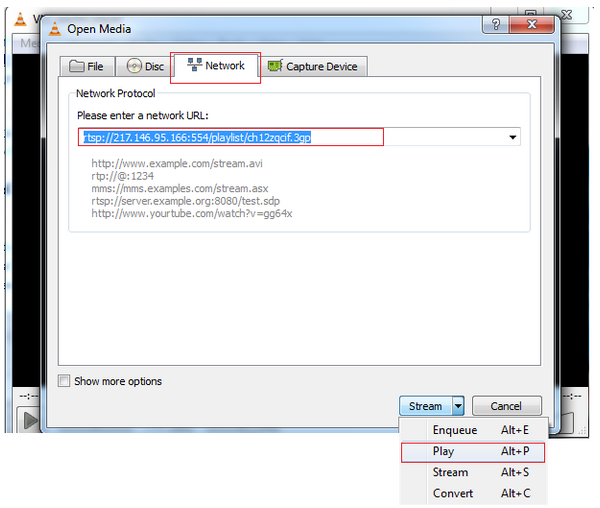
Now go to the third tab ‘NETWORK’ .Enter the URL of your favourite channel which you want to watch .
For Example: URL of B4U Music channel – rtsp://217.146.95.166:554/playlist/ch12zqcif.3gp
On the right side there is ‘Stream dropdown’. Select ‘PLAY’.
stream Online TV Channels In VLC Player
Now you have learnt how to stream free online channels in VLC media player. You can get URL of your favourite TV channels easily by simply search URL of your fav channel on Google. Enjoy Watching!

Streaming URLs of Other TV Channels

I have given multiple streaming address of TV channels in a text file. This can be downloaded from below button.

download button
Read Full Post »
By Admin - 20:26
Labels: Android, Computer Tips, Earning, Game, Hacking, Other

How to Recover Deleted File || 100% Recover Deleted File

Admin Android , Computer Tips
How to Recover  Deleted File || 100% Recover Deleted File
Losing files is upset. Every now and then, we go through unfortunate situations. One such situation is accidental deletion of your important file. It could be a document, image or a video. Regardless of what type of file you have just lost, nothing is harder for the best free data recovery software – EaseUS. Remember, there is a difference between restoring files from recycle bin and recovering data after permanent deletion. EaseUS software has ability to even restore those files that got deleted when you clicked on empty recycle bin.
Let us tell you, there are numerous paid and data recovery software solutions available in the market. If you are a first timer, then you might want a tool that provides its services for free, which is quite a good deal. This is because you want to check the software skills before using it. How can you identify which one is the best software till you give it a try.  Therefore, you must check it before putting your hard-earned money into it. Also, you should be seeking out for a tool that’s easy-to-use rather than trouble-to-use.
How EaseUS data recovery software works?

As soon as you open the EaseUS Data Recovery software, the screen will show you all drives including hard drives and external drives. Being the prominent provider of enjoyable user experience, EaseUS performs unbelievably fast scanning of hard drives and other storage devices, and restores all data back through its quick scan. 
After scanning, deleted files will appear in front of you. This will give users an opportunity to select the file which they lost accidentally. At this stage, user may browse the file name by typing the file name or if you can’t remind of that file name, you can always search for files by their format.
Select the required file and then press recover button. While restoring the files back, make sure to save it on a different partition. This would prevent you to replace the old information with the new one. The software gives full control over which data to retrieve and where the data should be located.
EaseUS free data recovery options are wrapped up into an advanced UI that is quite simple, as well as responsive. It makes sure you get all your recovered data promptly.
Once the data restoration gets completed, the software will notify you about it. Hence, it’s quite possible to retrieve your files back after emptying recycle bin, but you are required to take these few factors into account.
  • Never install this software in the same drive you aim to get the deleted files back from. Or else, the software will erase your deleted file.
  • Ensure to keep all your drives untouched and do not copy paste anything. 

 Download now
Read Full Post »
By Admin - 20:15
Labels: Android, Computer Tips, Hacking, Other

Tuesday, 3 March 2020

Hack Wi-Fi Passwords using an Android mobile

Admin Android , Hacking
Hack Wi-Fi Passwords using an Android mobile


See How To Hack WiFi Password With Android Phone

There are many people who do not have computers at home. There are many people who do not know how to use Linux Kali. There are many people who don't know how to hack Wi-Fi passwords.

How to hack Wifi ?

Now about 3 billion people use Android mobile. This article is intended for those who can use Wi-Fi for free. Hacking wi-fi is not an easy task. But I will give a simple hack tips so that even a school student can hack Wi-Fi passwords.
To hack the Wi-Fi password, you need to root the phone first. Rooting is not a difficult task. This can be done using an app. The name of the app is (root checker basic). The mobile phone can be routed very easily using these apps.
The phone must have more Broadcom bcm4329 or bcm4330 set. These apps are available from Google. Not all types of phones can use this app. Some of the phones that can be used for this are:
Nexus one
Samsung S series
Desire HD
Broadcom chipset can be installed for these mobile phones. Once the app is installed it will have to be launched.
Then download the River Apps and install it. Then click on the Confirm button when the text says "You are not using it for illegal purposes".
The river will then begin scanning the apps. If you get an access point, just clicking the Wi-Fi password will be hacked.
Read Full Post »
By Admin - 17:19
Labels: Android, Hacking

Sunday, 1 March 2020

Build Your Own Currency Exchange Web App

Admin Android , Computer Tips
Build Your Own Currency Exchange Web App

Build Your Own Currency Exchange Web App in ~100 lines using CRA 


This tutorial describes how to create a simple currency exchange app in just about 100 lines of code using the Create React App boilerplate.

To see it in action check out this live demo.

🛠️ Preparation

First, create the react app. I call it "rates".
$ yarn create react-app rates
Run the command in your root
$ yarn start
Your web app will be available on http://localhost:3000

⚓ Fetching the currencies rate

For currency exchange data we will use free API on exchangeratesapi.io
We will load the latest data of the currencies rates.
Install the swr and unfetch libraries. It helps to easily fetch API.
$ yarn add swr unfetch
Create the fetcher function outside the App component
// src/App.js
import React from "react";
import "./App.css";
import fetch from "unfetch";

const API_URL = "https://api.exchangeratesapi.io";

const fetcher = async path => {
  const res = await fetch(API_URL + path);
  const json = await res.json();
  return json;
};

// function App...
Add useSWR in App component to fetch data
import React from "react";
import "./App.css";
import fetch from "unfetch";
import useSWR from "swr";

 // API_URL = ...

 // const fetcher = ...

 function App() {
  const { data: currencies } = useSWR("/latest?base=EUR", fetcher);

  return <div>Welcome to your Currency exchange app!</div>;
 }
Now we have the currencies rates in currencies.rates variable.
To see the JSON data of currencies rates you can open the API url directly into your browser: https://api.exchangeratesapi.io/latest?base=EUR
The ?base=EUR query is used to get all rates relative to EUR currency.

💄 Add the UI

For ui, we will use the material-ui design system. Install it:
$ yarn add @material-ui/core
Create the UI for our currency exchange app in the App component.
// ...
import {
  Container,
  Paper,
  Grid,
  TextField,
  Select,
  MenuItem
} from "@material-ui/core";

// ...

function App() {
  const { data: currencies } = useSWR("/latest?base=EUR", fetcher);

  if (!currencies) {
    return null;
  }

  return (
    <Container className="currency-exchange-container" fixed>
      <h1>Currency exchange</h1>
      <Paper
        className="currency-exchange-paper"
        variant="outlined"
        elavation={1}
      >
        <Grid container spacing={3}>
          <Grid item xs={6}>
            <TextField type="number" />
          </Grid>
          <Grid item xs={6}>
            <TextField type="number" />
          </Grid>
          <Grid item xs={6}>
            <Select>
              <MenuItem value={"EUR"}>EUR</MenuItem>
              {Object.keys(currencies.rates).map((rate, key) => (
                <MenuItem key={key} value={rate}>
                  {rate}
                </MenuItem>
              ))}
            </Select>
          </Grid>
          <Grid item xs={6}>
            <Select>
              <MenuItem value={"EUR"}>EUR</MenuItem>
              {Object.keys(currencies.rates).map((rate, key) => (
                <MenuItem key={key} value={rate}>
                  {rate}
                </MenuItem>
              ))}
            </Select>
          </Grid>
        </Grid>
      </Paper>
    </Container>
  );
}
Now, look at the following code snippet. We create the currency selection box by iterating over all possible rates from our API data. Since we fetch rates relative to EUR, so we should manually add the EUR item, because it doesn't exist in rates object.
  <Select>
    <MenuItem value={"EUR"}>EUR</MenuItem>
    {Object.keys(currencies.rates).map((rate, key) => (
      <MenuItem key={key} value={rate}>
        {rate}
      </MenuItem>
    ))}
  </Select>
When the currencies are not loaded, we just return null, because of currencies rates is undefined at that moment.
  if (!currencies) {
    return null;
  }
Add some styles to App.css
h1 {
  font-weight: 300;
  color: #636363;
  margin-bottom: 3rem;
}

.currency-exchange-container {
  display: flex;
  flex-direction: column;
  align-items: center;
  justify-content: center;
  height: 100vh;
}

.currency-exchange-paper {
  max-width: 350px;
  padding: 30px 30px 40px 30px;
}

.MuiInput-root {
  width: 100%;
}

⚙️ Add logic

Now we add the inputs state to our App component
function App() {
  const { data: currencies } = useSWR("/latest?base=EUR", fetcher);

  const [fromValue, setFromValue] = useState(1);
  const [toValue, setToValue] = useState(1);

  const [fromCurrency, setFromCurrency] = useState("EUR");
  const [toCurrency, setToCurrency] = useState("EUR");

  const handleFromCurrencyChange = e => {
    setFromCurrency(e.target.value);
  };

  const handleToCurrencyChange = e => {
    setToCurrency(e.target.value);
  };

  const handleFromValueChange = e => {
    setFromValue(parseFloat(e.target.value));
  };

  const handleToValueChange = e => {
    setToValue(parseFloat(e.target.value));
  };

  if (!currencies) {
    return null;
  }

  return (
    <Container className="currency-exchange-container" fixed>
      <h1>Currency exchange</h1>
      <Paper
        className="currency-exchange-paper"
        variant="outlined"
        elavation={1}
      >
        <Grid container spacing={3}>
          <Grid item xs={6}>
            <TextField
              type="number"
              value={fromValue}
              onChange={handleFromValueChange}
            />
          </Grid>
          <Grid item xs={6}>
            <TextField
              type="number"
              value={toValue}
              onChange={handleToValueChange}
            />
          </Grid>
          <Grid item xs={6}>
            <Select value={fromCurrency} onChange={handleFromCurrencyChange}>
              <MenuItem value={"EUR"}>EUR</MenuItem>
              {Object.keys(currencies.rates).map((rate, key) => (
                <MenuItem key={key} value={rate}>
                  {rate}
                </MenuItem>
              ))}
            </Select>
          </Grid>
          <Grid item xs={6}>
            <Select value={toCurrency} onChange={handleToCurrencyChange}>
              <MenuItem value={"EUR"}>EUR</MenuItem>
              {Object.keys(currencies.rates).map((rate, key) => (
                <MenuItem key={key} value={rate}>
                  {rate}
                </MenuItem>
              ))}
            </Select>
          </Grid>
        </Grid>
      </Paper>
    </Container>
  );
}
Also, add the two following functions for currency exchange
const convertFromTo = () => {
    const fromRate =
      fromCurrency === "EUR" ? 1 : currencies.rates[fromCurrency];
    const valueInEur = fromValue / fromRate;
    const toRate = toCurrency === "EUR" ? 1 : currencies.rates[toCurrency];
    setToValue(valueInEur * toRate);
  };

  const convertToFrom = () => {
    const toRate = toCurrency === "EUR" ? 1 : currencies.rates[toCurrency];
    const valueInEur = toValue / toRate;
    const fromRate =
      fromCurrency === "EUR" ? 1 : currencies.rates[fromCurrency];
    setFromValue(valueInEur * fromRate);
  };
One function converts currencies forward, and other - backward. In both functions, firstly, we convert currencies to EUR, because all rates we fetched from API are relative to euros.
The last thing is to add the React hooks which run the rates exchange after the input change.
  useEffect(() => {
    convertFromTo();
  }, [fromValue, toCurrency]);

  useEffect(() => {
    convertToFrom();
  }, [toValue, fromCurrency]);
Here is a full App.js file
import React, { useState, useEffect } from "react";
import "./App.css";
import fetch from "unfetch";
import useSWR from "swr";
import {
  Container,
  Paper,
  Grid,
  TextField,
  Select,
  MenuItem
} from "@material-ui/core";

const API_URL = "https://api.exchangeratesapi.io";

const fetcher = async path => {
  const res = await fetch(API_URL + path);
  const json = await res.json();
  return json;
};

function App() {
  const { data: currencies } = useSWR("/latest?base=EUR", fetcher);

  const [fromValue, setFromValue] = useState(1);
  const [toValue, setToValue] = useState(1);

  const [fromCurrency, setFromCurrency] = useState("EUR");
  const [toCurrency, setToCurrency] = useState("EUR");

  const handleFromCurrencyChange = e => {
    setFromCurrency(e.target.value);
  };

  const handleToCurrencyChange = e => {
    setToCurrency(e.target.value);
  };

  const handleFromValueChange = e => {
    setFromValue(parseFloat(e.target.value));
  };

  const handleToValueChange = e => {
    setToValue(parseFloat(e.target.value));
  };

  const convertFromTo = () => {
    const fromRate =
      fromCurrency === "EUR" ? 1 : currencies.rates[fromCurrency];
    const valueInEur = fromValue / fromRate;
    const toRate = toCurrency === "EUR" ? 1 : currencies.rates[toCurrency];
    setToValue(valueInEur * toRate);
  };

  const convertToFrom = () => {
    const toRate = toCurrency === "EUR" ? 1 : currencies.rates[toCurrency];
    const valueInEur = toValue / toRate;
    const fromRate =
      fromCurrency === "EUR" ? 1 : currencies.rates[fromCurrency];
    setFromValue(valueInEur * fromRate);
  };

  useEffect(() => {
    convertFromTo();
  }, [fromValue, toCurrency]);

  useEffect(() => {
    convertToFrom();
  }, [toValue, fromCurrency]);

  if (!currencies) {
    return null;
  }

  return (
    <Container className="currency-exchange-container" fixed>
      <h1>Currency exchange</h1>
      <Paper
        className="currency-exchange-paper"
        variant="outlined"
        elavation={1}
      >
        <Grid container spacing={3}>
          <Grid item xs={6}>
            <TextField
              type="number"
              value={fromValue}
              onChange={handleFromValueChange}
            />
          </Grid>
          <Grid item xs={6}>
            <TextField
              type="number"
              value={toValue}
              onChange={handleToValueChange}
            />
          </Grid>
          <Grid item xs={6}>
            <Select value={fromCurrency} onChange={handleFromCurrencyChange}>
              <MenuItem value={"EUR"}>EUR</MenuItem>
              {Object.keys(currencies.rates).map((rate, key) => (
                <MenuItem key={key} value={rate}>
                  {rate}
                </MenuItem>
              ))}
            </Select>
          </Grid>
          <Grid item xs={6}>
            <Select value={toCurrency} onChange={handleToCurrencyChange}>
              <MenuItem value={"EUR"}>EUR</MenuItem>
              {Object.keys(currencies.rates).map((rate, key) => (
                <MenuItem key={key} value={rate}>
                  {rate}
                </MenuItem>
              ))}
            </Select>
          </Grid>
        </Grid>
      </Paper>
    </Container>
  );
}

export default App;

✨ Finished!

Congratulations! You have done the currency exchange app using the CRA (Create React App).
The full source code you can find in my repository epranka/rates.
Live demo.


Read Full Post »
By Admin - 13:03
Labels: Android, Computer Tips, Earning, Game, Hacking, Other

Sunday, 23 February 2020

Live TV Channel No Ads 50+ Bangladeshi Channel

Admin Android , Computer Tips
Live TV Channel No Ads  50+ Bangladeshi Channel

Free Live TV Channel  দেখুন এএকদম ফ্রি, আনলিমিটেড

Download Free Live TV.apk


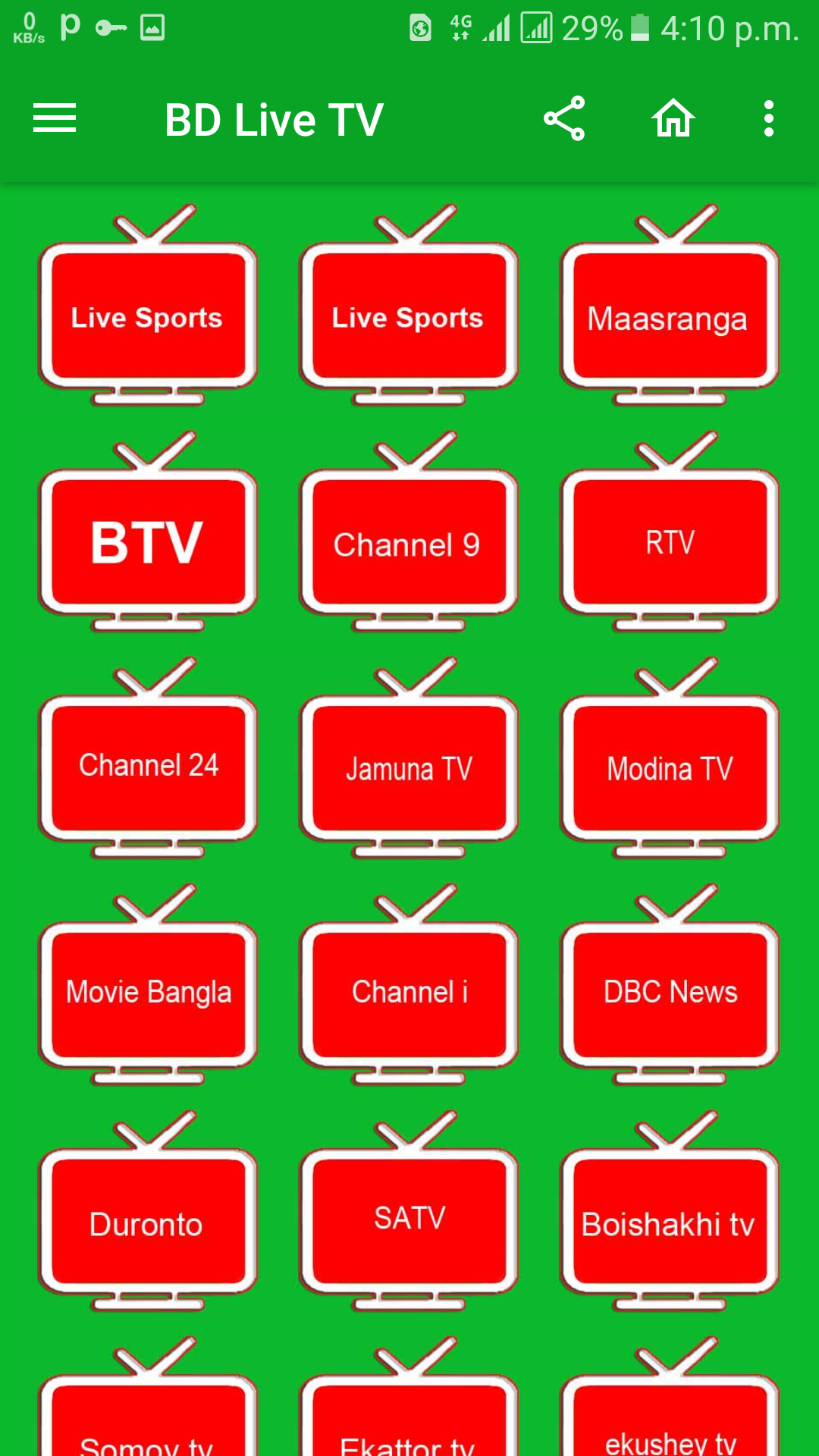
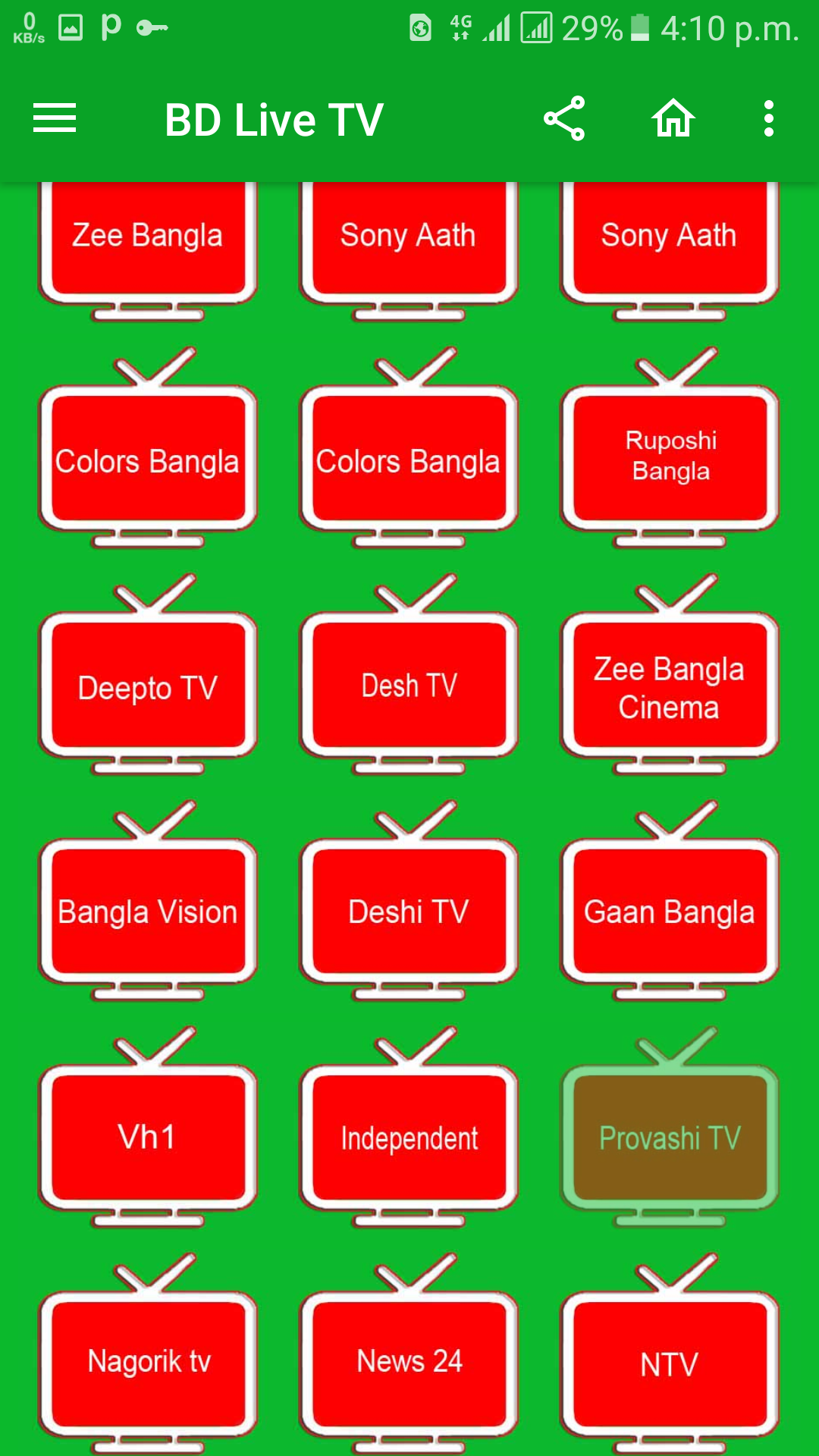
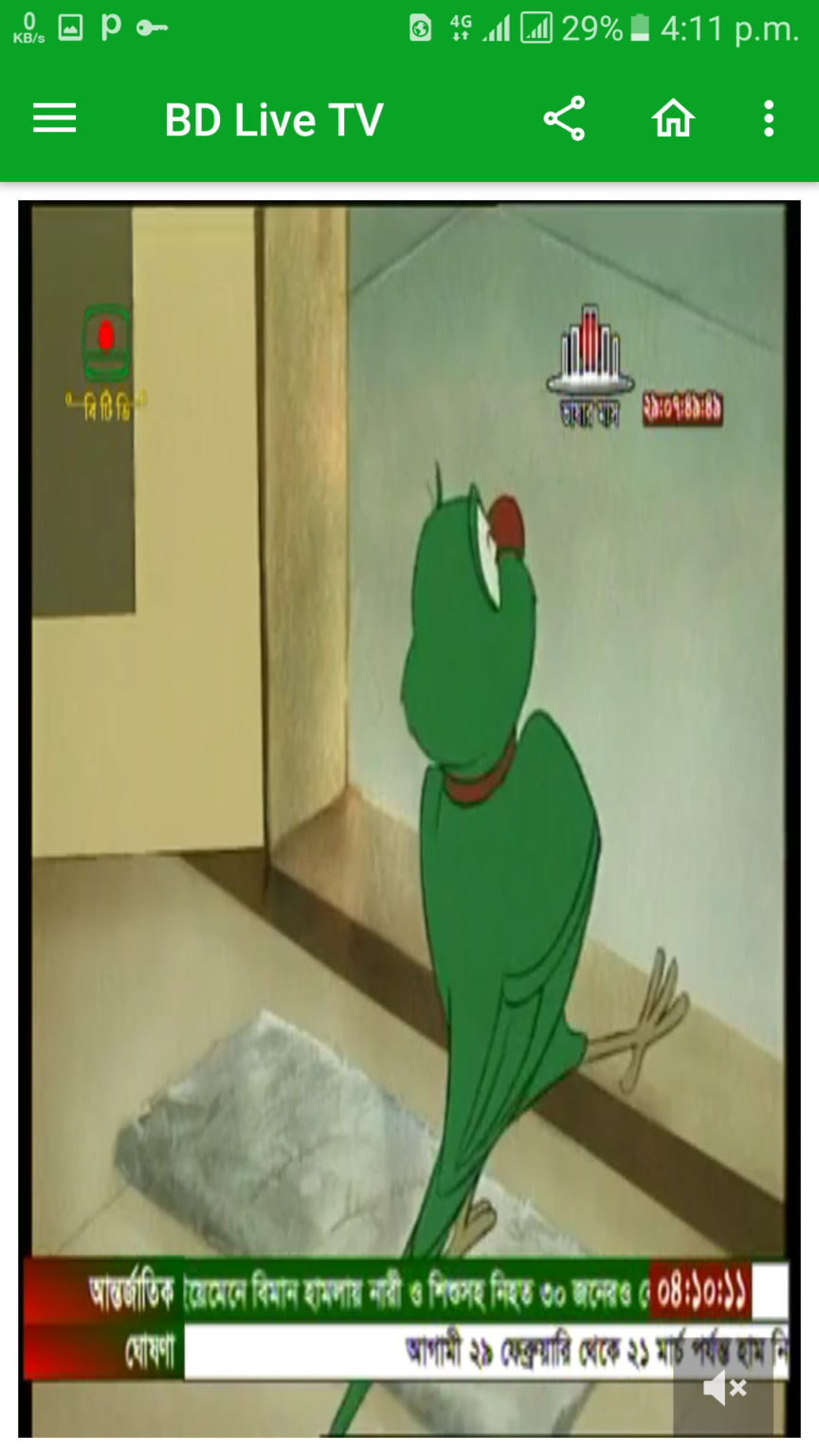
এখন এই অ্যাপ থেকে প্রায় ৫০+ টিভি চ্যানেল দেখা যাবে তাও আবার ১০০ kbps স্পিডে।আর কোয়ালিটিও যথেষ্ট ভালো যা আপনি নিচের স্ক্রিনশট এ দেখতে পাচ্ছেন।

স্ক্রিনশট :


বিশেষ সুবিধা:


১.৫০+ চ্যানেল এড আছে।
২.লোডিং কম লাগে। 3g কোনো রকম পেলেই চলবে।
৩.অ্যাপ এর নিজস্ব ভিডিও প্লেয়ার আছে।যার কারনে এক্সট্রা স্টোরেজ খরচ হবে না। যদিও এটি আগের ফিচার।
৪.সকল ধরনের চ্যানেল রয়েছে।যেমন:নাটক,খেলা,এনিমেল প্লেনেট,Discovery,হিন্দি,খবর।এসকল ধরনের চ্যানেল রয়েছে।
৫.অ্যাপ টিতে এড দেখাতো।যা খুব বিরক্তিকর। যা আমি নিজে মোড করে এড বন্ধ করিয়েছি।তাই আপনারা এড দেখার বিরক্তি ছাড়াই টানা লাইভ টিভি দেখতে পারবেন। নিচে ডাউনলোড লিংক দেওয়া হলো।

Download Free Live TV.apk


Read Full Post »
By Admin - 16:10
Labels: Android, Computer Tips, Earning, Hacking, Other

Talk for 50 minutes to get all the sim for free.

Admin Android , Earning
Talk for 50 minutes to get all the sim for free.

50 মিনিট কথা বলুন ফ্রিতে সব সিমে সবাই পাবেন। 

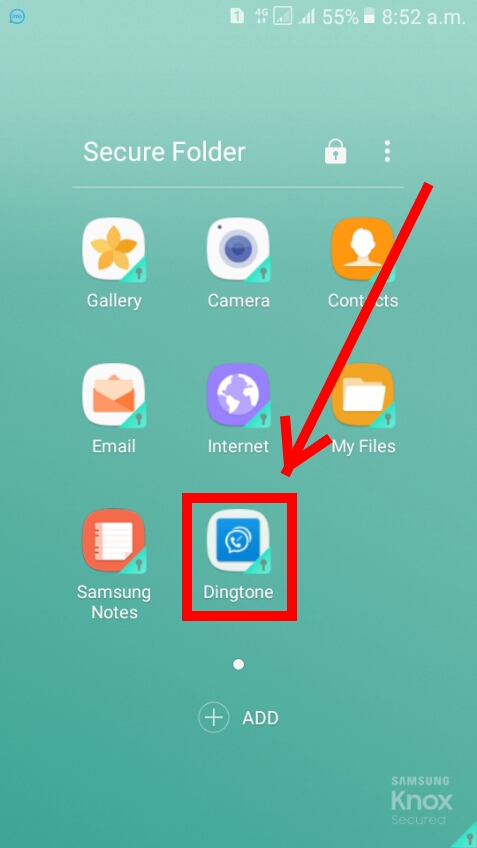
প্রথমে আপনাদের একটি সফ্টওয়্যার ডাউনলোড করতে হবে। এই লিন্ক থেকে ডাউনলোড করে নিন ।
 
তারপর এপটি ওপেন করুন। তারপর ৩ বার বা দিকে নিন

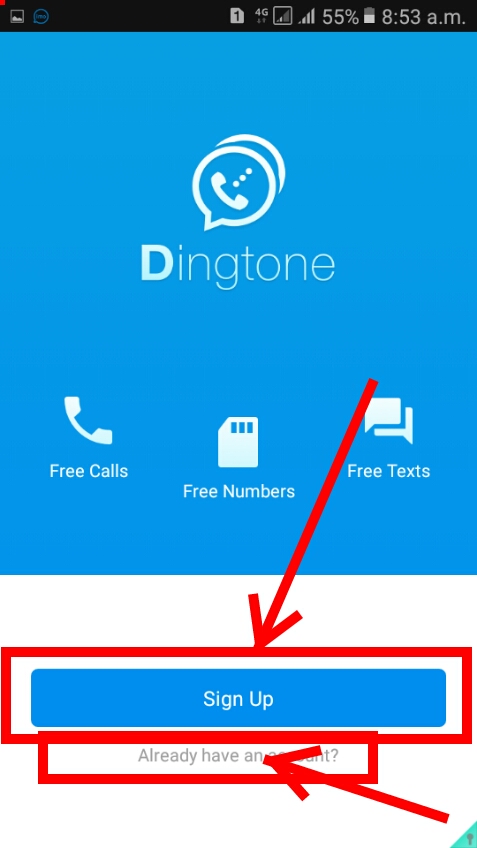
তারপর যাদের আগে থেকে একাউন্ট্ আছে তারা লগিন করুন আর যাদের নেই তারা signup এ ক্লিক করুন।


তারপর signup করুন।email অথবা mobile number দিয়ে signup করতে পারেন। তারপর নাম ও পাসওয়ার্ড দিয়ে signup করে ফেলুন।
তারপর more এ ক্লিক করুন।


দেখুন আমার মাত্র 16,50 credit আছে।আপনারা যদি নতুন হন তাহলে 10 credit থাকবে। তারপর Dingtone credit এ ক্লিক করোন। তারপর নিচে দেওয়া কোডগুলো একটি একটি করে ওখানে পেস্ট করুন। এইভাবে ।

এভাবে কোডগুলো কপি করে পেশ্ট করতে থাকুন। একটি কোড শুধুমাত্র একবার ব্যবহার করতে পারবেন। তারপর back দিয়ে বের হয়ে আসুন। দেখুন কত credit হয়েছে।
 তারপর call ক্লিক করে কল করুন যেকোনো নাম্বারে। বাংলাদেশ এর নাম্বার হলে 50 মিনিট কথা বলতে পারবেন। চাইলে credit শেষ হওয়ার পর আবার নতুন করে নতুন email দিয়ে আবার একাউন্ট্ করে আরো 50 মিনিট কথা বলুন।
Read Full Post »
By Admin - 15:55
Labels: Android, Earning, Hacking

Monday, 17 February 2020

WiFi Hacking App for Android All in One

Admin Android , Hacking
WiFi Hacking App for Android All in One
HIJACKER : All in One WiFi Hacking App for Android | Mr. SAGE

Hijacker is a Graphical User Interface for the penetration testing tools Aircrack-ng, Airodump-ng, MDK3 and Reaver. It offers a simple and easy UI to use these tools without typing commands in a console and copy&pasting MAC addresses.
This application requires an ARM android device with an internal wireless adapter that supports Monitor Mode. A few android devices do, but none of them natively. This means that you will need a custom firmware. Any device that uses the BCM4339 chipset (MSM8974, such as Nexus 5, Xperia Z1/Z2, LG G2, LG G Flex, Samsung Galaxy Note 3) will work with Nexmon (which also supports some other chipsets). Devices that use BCM4330 can use bcmon.
An alternative would be to use an external adapter that supports monitor mode in Android with an OTG cable.
The required tools are included for armv7l and aarch64 devices as of version 1.1. The Nexmon driver and management utility for BCM4339 and BCM4358 are also included.
Note : Root access is also necessary, as these tools need root to work.

Features :

Information Gathering

  • View a list of access points and stations (clients) around you (even hidden ones)
  • View the activity of a specific network (by measuring beacons and data packets) and its clients
  • Statistics about access points and stations
  • See the manufacturer of a device (AP or station) from the OUI database
  • See the signal power of devices and filter the ones that are closer to you
  • Save captured packets in .cap file

Attacks

  • Deauthenticate all the clients of a network (either targeting each one (effective) or without specific target)
  • Deauthenticate a specific client from the network it's connected
  • MDK3 Beacon Flooding with custom options and SSID list
  • MDK3 Authentication DoS for a specific network or to every nearby AP
  • Capture a WPA handshake or gather IVs to crack a WEP network
  • Reaver WPS cracking (pixie-dust attack using NetHunter chroot and external adapter)

Other

  • Leave the app running in the background, optionally with a notification
  • Copy commands or MAC addresses to clipboard
  • Includes the required tools, no need for manual installation
  • Includes the Nexmon driver, required library and management utility for BCM4339 and BCM4358 devices
  • Set commands to enable and disable monitor mode automatically
  • Crack .cap files with a custom wordlist
  • Create custom actions and run them on an access point or a client easily
  • Sort and filter Access Points and Stations with many parameters
  • Export all gathered information to a file
  • Add a persistent alias to a device (by MAC) for easier identification
HIJACKER : All in One WiFi Hacking App for Android | Mr. SAGEHIJACKER : All in One WiFi Hacking App for Android | Mr. SAGEHIJACKER : All in One WiFi Hacking App for Android | Mr. SAGE

Installation :

Make Sure :
  • you are on Android 5+
  • you are rooted (SuperSU is required, if you are on CM/LineageOS install SuperSU)
  • you have a firmware to support Monitor Mode on your wireless interface

Download The Latest Version : Click Here

When you run Hijacker for the first time, you will be asked whether you want to install the nexmon firmware or go to home screen. If you have installed your firmware or use an external adapter, you can just go to the home screen. Otherwise, and if your device is supported, click 'Install Nexmon' and then 'Install'. Afterwards you will land on the home screen and airodump will start. Make sure you have enabled your WiFi and it's in monitor mode.
Note: On some devices, changing files in /system might trigger an Android security feature and your system partition will be restored when you reboot.

Troubleshooting :

This app is designed and tested for ARM devices. All the binaries included are compiled for that architecture and will not work on anything else. You can check whether your device is compatible by going to Settings: if you have the option to install Nexmon, then you are on the correct architecture, otherwise you will have to install all the tools manually (busybox, aircrack-ng suite, mdk3, reaver, wireless tools, libfakeioctl.so library) in a PATH accessible directory and set the 'Prefix' option for the tools to preload the library they need: LD_PRELOAD=/path/to/libfakeioctl.so.
In settings, there is an option to test the tools. If something fails, you can click 'Copy test command' and select the tool that fails. This will copy a test command to your clipboard, which you can manually run in a root shell and see what's wrong. If all the tests pass and you still have a problem, feel free to open an issue here to fix it, or use the 'Send feedback' option in the app's settings.
If the app happens to crash, a new activity will start which will generate a bug report in your external storage and give you the option to submit it by email. The report is shown in the activity so you can see exactly what will be sent.

Do not report bugs for devices that are not supported or when you are using an outdated version.

Keep in mind that Hijacker is just a GUI for these tools. The way it runs the tools is fairly simple, and if all the tests pass and you are in monitor mode, you should be getting the results you want. Also keep in mind that these are auditing tools. This means that they are used to test the integrity of your network, so there is a chance (and you should hope for it) that the attacks don't work on your network. It's not the app's fault, it's actually something to be happy about (given that this means that your network is safe). However, if an attack works when you type a command in a terminal, but not with the app, feel free to post here to resolve the issue. This app is still under development so bugs are to be expected.

Warning :

Legal

It is highly illegal to use this application against networks for which you don't have permission. You can use it only on YOUR network or a network that you are authorized to. Using software that uses a network adapter in promiscuous mode may be considered illegal even without actively using it against someone. I am not responsible for how you use this application and any damages you may cause.

Device

The app gives you the option to install the Nexmon firmware on your device. Even though the app performs a chipset check, mistakes happen. The app currently includes the Nexmon firmware for BCM4339 and BCM4358 only. Installing the wrong firmware on a device may damage it (and I mean hardware, not something that is fixable with factory reset). I am not responsible for any damage caused to your device by this software.

That's It !!! if you like this post please like & share with your friends..
Read Full Post »
By Admin - 12:13
Labels: Android, Hacking

Sunday, 9 February 2020

How to Bypass Root Check and Certificate Pinning

Admin Android , Hacking
How to Bypass Root Check and Certificate Pinning
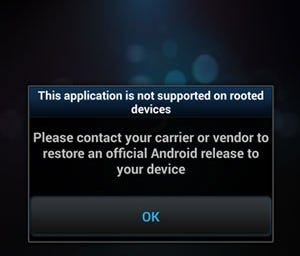
Recently I needed to pentest an Android application. When I installed the app to my virtual device (Android Emulator), a pop up notification came out saying “This app can’t run in rooted devices”… so I needed a solution.
After a quick Google search, I found the first way… bypassing using an “Xposed” module.


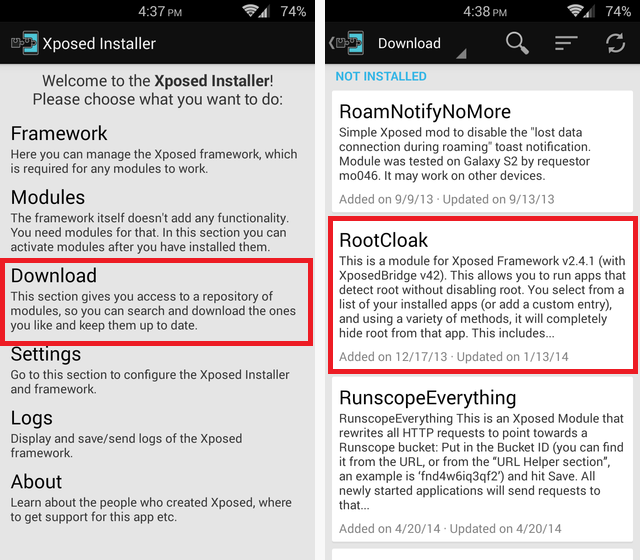
 Bypass Root Check Using Xposed:1) Install Xposed
2) Install “RootCloak” (Xposed Module)
3) Open RootCloak > Add/Remove Apps > (select target app) and tap it.
4) Done! (open app and check if it’s works)


Unfortunately this didn’t work for me, so… let’s do this the “hard way” (or should i say… “old school”? :) ).
Bypass Root Check Manual Way:1) Decompile the APK file using “APKTool”
# apktool d /path/to/apk/target.apk -o /path/to/output/
(“d” for “decompile” and “-o” for output dir)
2) Most root detection techniques rely on checking for files on the OS that indicate the device has been rooted. Using GREP, search for any of the follow strings and change them to something random:
- Superuser
- Supersu
- /su
- /system/app/Superuser.apk
- /system/bin
- /system/bin/su
- /system/sd/xbin
- /system/xbin/su
- /system/xbin
- /data/local
- /data/local/bin
- /data/local/xbin
- /sbin
- /system/bin/failsafe
- /vendor/bin
Note: Other detection techniques look for any of the below-installed packages on the mobile device at runtime:
- supersu.apk
- Busybox
- Root Cloak
- Xpose framework
- Cydia
- Substrate
3) Build the new version of APK with APKTool:
# apktool b /path/to/modified apk/target-new.apk -o /path/to/output/
(“b” for “build” and “-o” for output dir)
4) Sign with jarsigner tool
# /path/to/my-key.keystore
-storepass password -keypass password target-new.apk alias_name
(You may need to generate the keystore first with keytool:)# keytool -genkey -v -keystore my-key.keystore -alias alias_name -keyalg RSA -keysize 2048 -validity10000
5) Finally, install the new version and enjoy!
Bonus Track:If you need to bypass Certificate Pinning (in order to use the app with Burp Proxy for example) you can do this:
Bypass Certificate Pinning With “Xposed” module:
1) Once you have Xposed installed on your phone, search for “SSLUnpinning” module. Install it.
2) Open SSLUnpinning, look for the app on which you are trying to bypass the certificate pinning, and select it.
Read Full Post »
By Admin - 16:37
Labels: Android, Hacking

Saturday, 2 March 2019

how to bar all information from any person or object picture.

Admin Android , Computer Tips
how to bar all information from any person or object picture.
Today I will show you how to see all the information with pictures of anything!
In fact, many of us use different social networks, the most advanced and popular Facebook, and this Facebook has countless Fake Account. If you want, you can understand the real person with that image.
Not only that, but we do not have much more fruit or flowers outside of our knowledge, we do not know any of the information we have ever seen. We found an unfamiliar fruit or flower in hand, by taking pictures of it, we can see the details, let us see how it can be done.
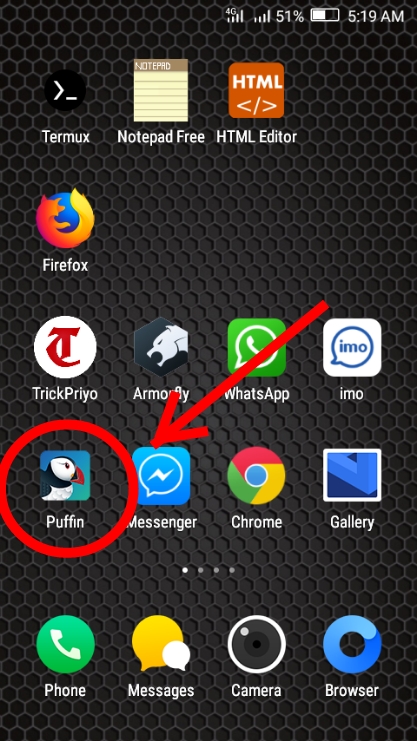
First choose a browser that is going to be a Desktop Version, I'm using Puffin Browser for doing it a lot faster and doing a Desktop Version.


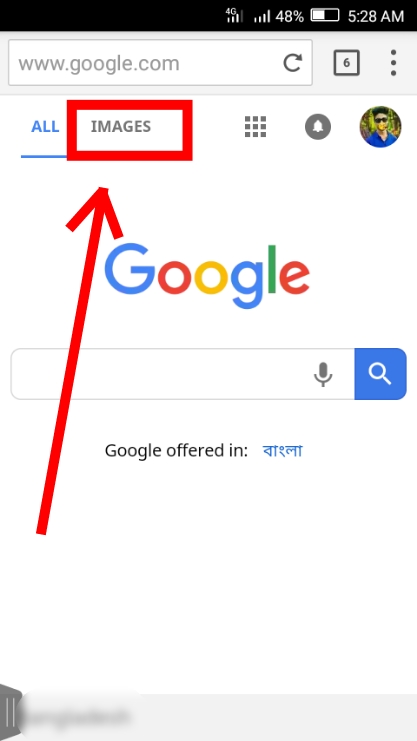
Now open the browser Go to-  Google.com 
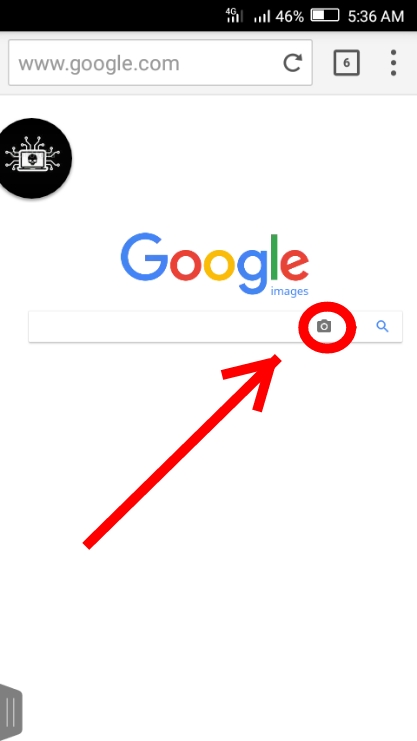
Now click to write IMAGES.

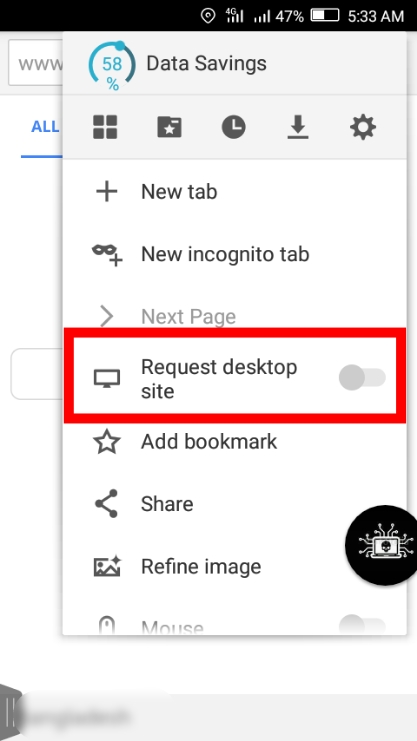
Now get your browser desktop version.
Now click on this camera icon.
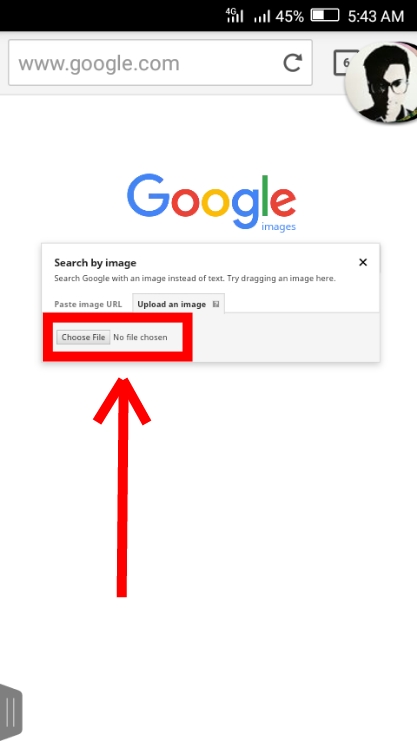
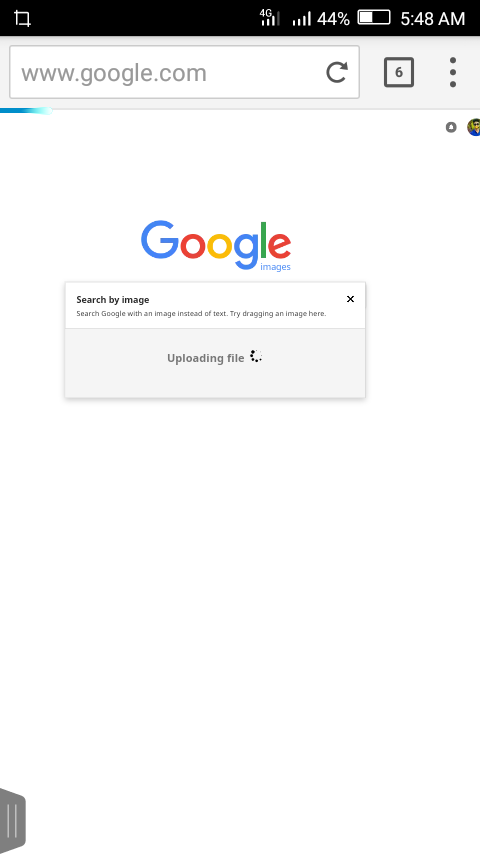
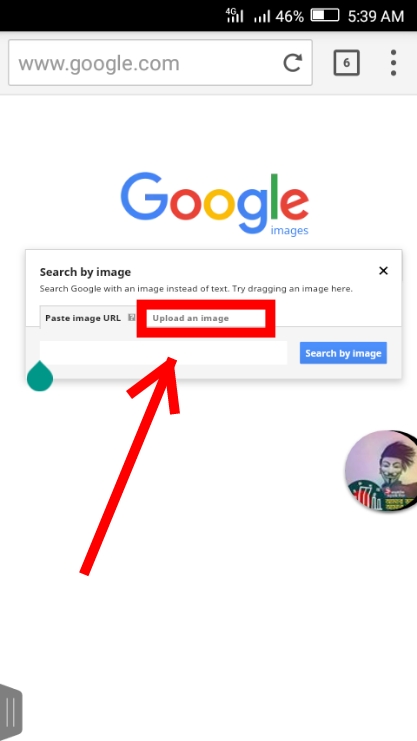
Now you can click on upload an image
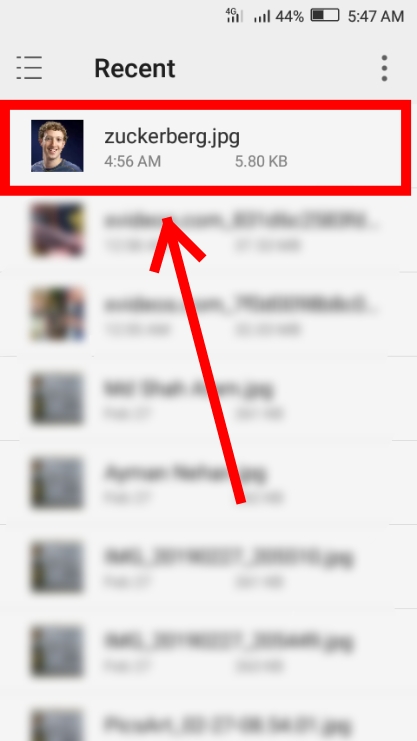
Now you can click on Choose File and upload the picture of your favorite or the picture you are looking for.
I chose Mark Zuckerberg's picture.
See the image being uploaded.
See the picture of Mark Zuckerberg's picture that I upload and also shows where the image is posted and the details of Mark Zuckerberg are being shown.
Read Full Post »
By Admin - 15:39
Labels: Android, Computer Tips

Thursday, 30 August 2018

Take 5 Most wanted and Real version Android Games (Updated)

Admin Android ,
 Take 5 Most wanted and Real version Android Games (Updated)
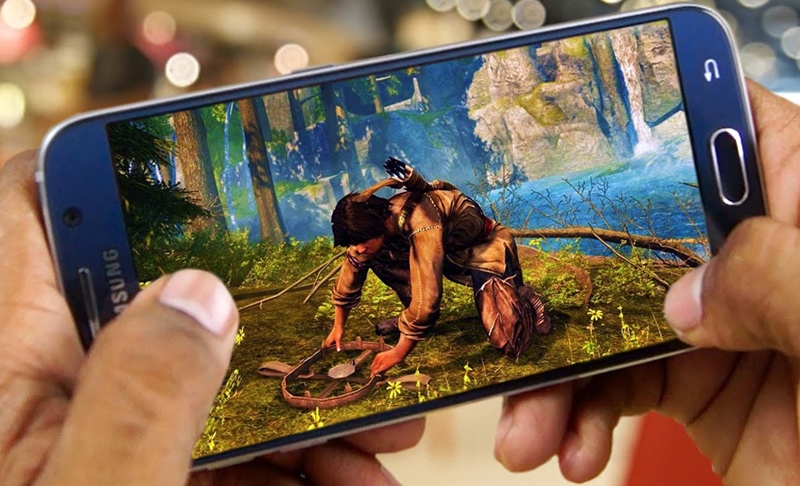
The best Android games (2018) You can use on your Android phone, there are many cool features in it. You'll love 100%

# Best Gaming Apps for Android:


#1. Batman The Enemy Within
=> It has occupied almost the entire space in the gaming world, Graphics + Comics + Action + Adventure + Reallity + its pair of matching functions for much more.
To download, click here. 


#2. Another Lost Phone
=> Laura's Story: In this game you have to
Look for lost phones with CID agent. Normally, help find the phone and be rewarded!
To download, click here. 


#3. Into The Dead 2
=> All zombies spread everywhere will live in the era and you will have to try to survive. You will be given many tools and the dead will have to be removed in any way. The game is really beautiful.
To download, click here. 


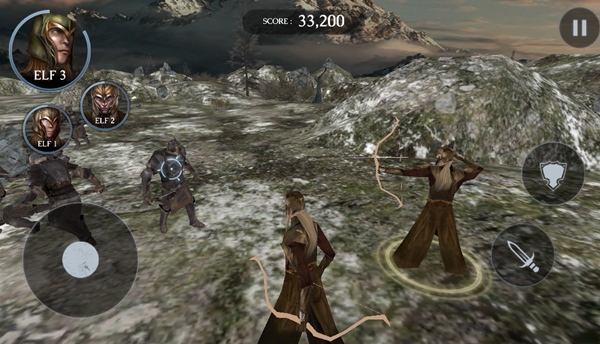
#4. Middle-Earth
=> Shadow of War: The robbers must collect the ring and play with the enemies only in the battle between the King Army. It's easy, but quite tactical game, you'll love it.
To download, click here. 


#5. Night Run
=> Inexpensive running games but graphics are like all night where you get shade of trees and other obstacles. Unlike other games, the player will become difficult to identify the obstacles in the face of the night, and it has become a really popular game to bypass the intellectuals.
To download, click here. 
Read Full Post »
By Admin - 11:59
Labels: Android
Older Posts Home

Categories

  • Android (32)
  • Computer Tips (13)
  • Earning (11)
  • Game (5)
  • Hacking (36)
  • Other (11)
  • Web development (2)

Facebook

Recent

Featured

Popular

  • How to fix ‘Your Device isn’t Compatible With this Version’ on Google Play Store
  • How to install MIUI 8 on any Android Phone
  • Hack Your Girlfriend or boyfriend Mobile Call/SMS/Photos Everythings
  • How to Bypass Root Check and Certificate Pinning
  • Who hacker? What is hacking? And what are the types of hackers? Know!

Recent Post

Recent Comments